PPP Haryana, officially known as Parivar Pehchan Patra Haryana, is one of the most important digital governance initiatives launched by the Government of Haryana. The scheme aims to create a verified Family ID for every household in the state so that government welfare schemes, subsidies, and services can be delivered accurately, transparently, and efficiently.
In this detailed guide, you will learn everything about PPP Haryana, including its purpose, benefits, registration process, login steps, correction process, eligibility, documents required, and how it helps citizens access government schemes easily.
| Important Note: Users are advised to download their ID only from the official PPP Haryana website. Sharing of login credentials with any individual or third party is strictly prohibited. |
What Is PPP Haryana? Two Meanings, One Powerful Impact
A. Parivar Pehchan Patra (PPP Haryana)
PPP Haryana ppp full form Parivar Pehchan Patra — a unique family identification system launched by the Government of Haryana.
The main purpose of Parivar Pehchan Patra (PPP) is to assign a unique PPP Family ID to every family in Haryana. This ID acts as a consolidated digital record that connects citizens to government welfare schemes — eliminating multiple applications and reducing paperwork.
B. Public-Private Partnership (PPP) Projects
In development and infrastructure planning, PPP in Haryana refers to strategic collaborations between the public sector and private companies to deliver major infrastructure, services, and social programs efficiently and sustainably
Haryana Parivar Pehchan Patra – PPP Login Procedure
- Open your browser & visit the PPP Haryana official website.
- Now Click on the “Citizen Login” option available on the homepage to PPP Haryana login.
- If you have your Family ID or PPP ID, then enter it. If you haven’t, then click the option “NO” to create a new one.
- For existing IDs, you have to verify using the OTP sent to your mobile for verification. Enter the OTP to log in.
- Now you can access your family details dashboard
Who Can Apply for PPP Haryana?
- Permanent residents of Haryana → Eligible for 8-digit Family ID
- Non-residents applying for Haryana govt services → Eligible for 9-digit temporary ID (starts with ‘T’)
- Aadhaar card of the family head is required
- Active mobile number for OTP verification
- No income limit for PPP registration
How to Register for Haryana Family ID (PPP Haryana)?
If you do not have a Family ID Haryana, you can easily register online under PPP Haryana, which stands for Parivar Pehchan Patra. This system issues an 8-digit Family ID for permanent residents of Haryana and a 9-digit Temporary Family ID (starting with “T”) for temporary residents.
Below is the complete step-by-step process to create your Haryana Family ID.
Step 1: Visit the Official Website
- Go to the official PPP Haryana portal:
- This is the only authorised website for Family ID Haryana registration
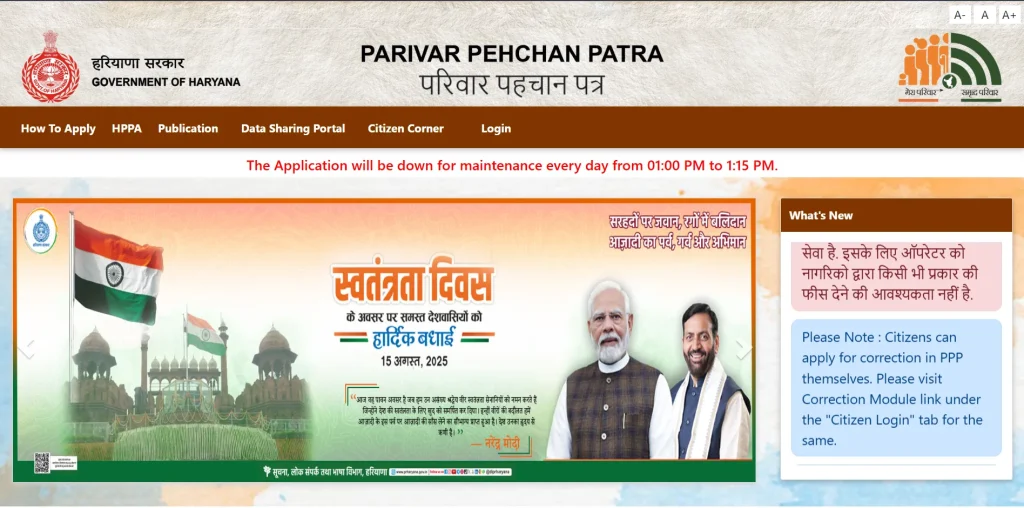
Step 2: Select New Registration
- On the homepage, click on “Citizen Login” to ppp haryana login
- If your family is not registered, choose the option to create a new Parivar Pehchan Number (PPN).
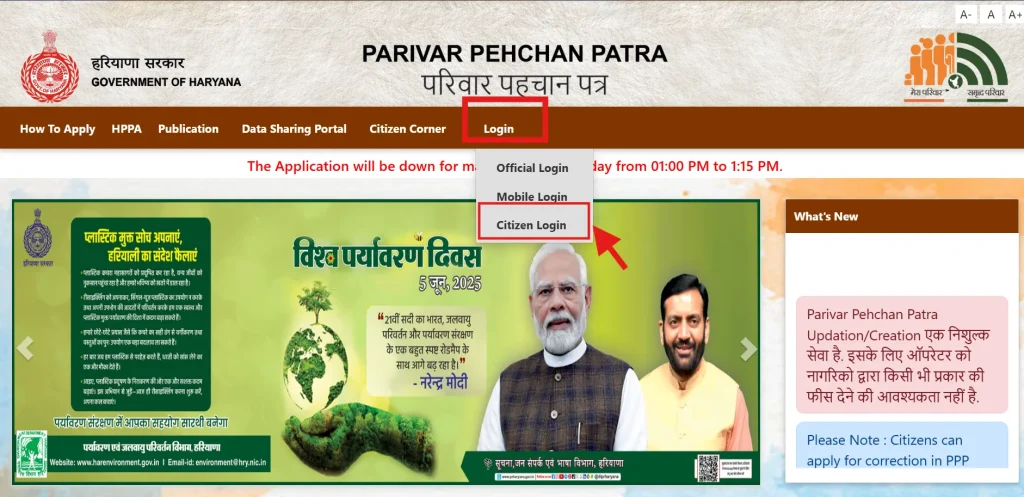
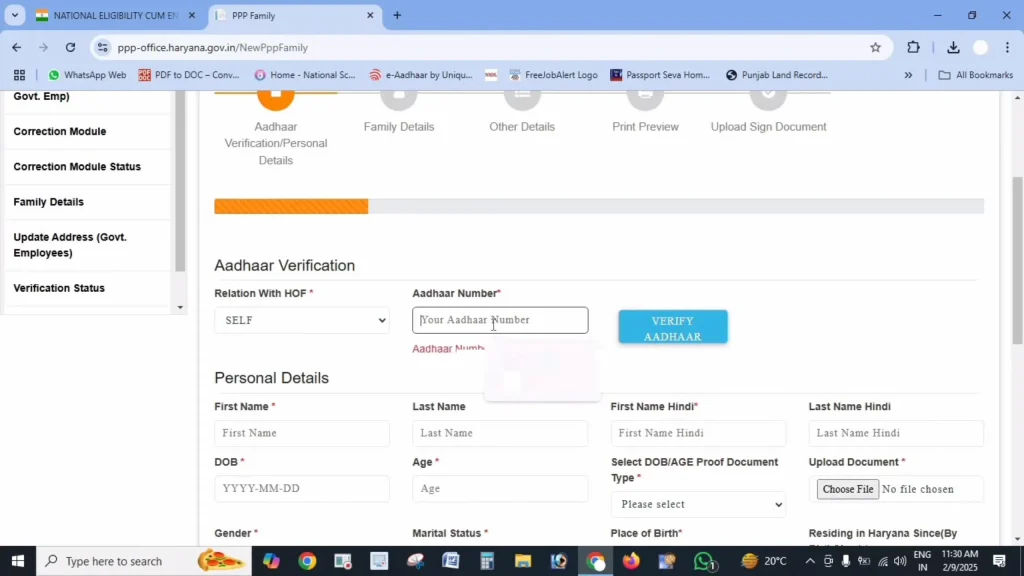
Step 3: Enter Aadhaar Number
- Enter the Aadhaar number of the Head of the Family.
- An OTP will be sent to the mobile number linked with Aadhaar.
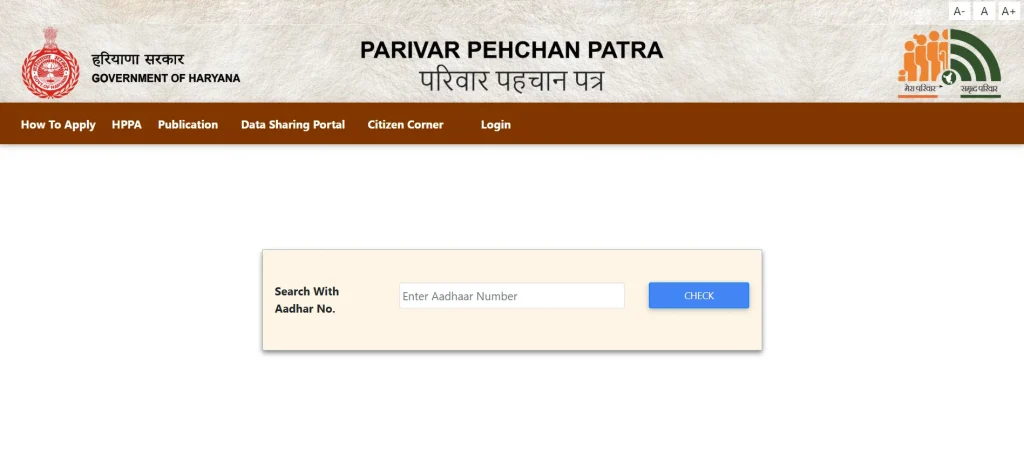
Step 4: Verify OTP
- Enter the OTP received on your registered mobile number to complete Aadhaar verification.
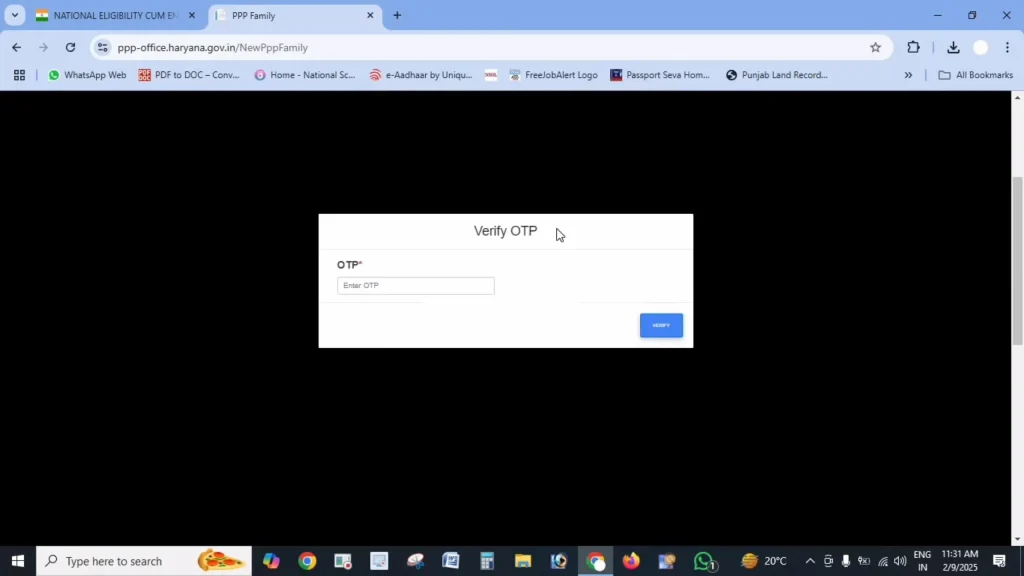
Step 5: Fill Personal Details
After Aadhaar verification, basic details will be auto-fetched. You must complete the remaining information carefully, including:
- Name in Hindi (first and last name, if applicable)
- Date of birth (select proof such as birth certificate, school certificate, voter ID, or matric certificate)
- Document number and issue date
- Gender and marital status
- Place of birth (inside or outside Haryana with district/town details)
- Duration of residence in Haryana
- Mobile number (mandatory)
- Email ID (optional)
- Caste category (SC/ST/OBC – proof required)
- Disability status (percentage and proof, if applicable)
- Voter ID details (if available)
- PAN card details (if available)
- Annual family income and income source
Step 6: Upload Required Documents
Upload clear PDF files (under 200 KB) of the following documents:
- Aadhaar cards of all family members
- Age proof (birth certificate or matric certificate)
- Voter ID (for adult members, if applicable)
- Address proof (electricity bill, ration card, etc.)
- Income or caste certificate (if applicable)
- Bank passbook or statement (if required for schemes)
- PAN card (if available)
Step 7: Add Family Member Details
Now enter details of all family members, including:
- Father’s details (Aadhaar, name in English and Hindi, alive or deceased, date of death if applicable)
- Mother’s details (Aadhaar and name)
- Spouse details (if applicable, with alive/deceased status)
- Children and other members (Aadhaar, name, date of birth, relationship)
- Complete address (house number, street, district, block, property ID, ownership status)
Step 8: Review and Submit
- Carefully review all entered details.
- Once confirmed, click on Submit to complete the application.
Step 9: Save Temporary Family ID
- After submission, you will receive a Temporary Family ID starting with “T”.
- Save this number or take a screenshot for future reference until verification is completed.
Required Documents For PPP ID Registration
- Aadhaar Card
- Voter ID
- Electricity bill
- Ration card
- Income Proof
- Caste Certificate
- Disability Proof (if applicable)
- PAN Card (if applicable)
| Reminder: Please ensure that you carry your original Aadhaar card and a printed copy of your Family ID while visiting any government office. |
PPP Haryana Download Options on PPP Portal
1. PPP Haryana Official Website
- Visit https://ppp-office.haryana.gov.in/
- You can download the Family ID / Parivar Pehchan Patra after completing registration.
- Steps:
- Log in with your Family ID or Aadhaar.
- Go to the “Download Family ID” or “Print Certificate” section.
- Save or print the PDF for official use.
2. PPP Haryana Mobile App
- The Haryana government provides a PPP Haryana mobile app for easier access.
- Features:
- Register a new family
- Check Family ID status
- Download/print Family ID
- Download links:
- Android (Google Play Store): Search for “PPP Haryana”
- iOS (App Store): Currently limited, mostly Android support
3. Other Downloads
- You can also download user manuals, forms, or help guides directly from the official portal.
- Look under sections like “Downloads” or “Citizen Services”.
PPP Haryana Update (Parivar Pehchan Patra Update)
1. Log In to the Official Portal
- Go to the PPP Haryana official site.
- Log in using your Family ID and verify with the OTP sent to your registered mobile.
2. Find the Update Section
- After login, go to the “Update Family Details” or “Correction Module” under your dashboard.
3. Select What You Want to Update
You can update many types of information, including:
- Add a new family member (e.g., birth, marriage)
- Remove a member (e.g., death or separation)
- Correct personal details (name, date of birth, education, occupation)
- Update address or mobile number
- Update bank account details for benefit transfers
4. Fill in New Information
- Enter the updated details in the appropriate fields.
- Upload supporting documents (PDF under 200 KB).
Examples of required docs may include a birth certificate, a marriage certificate, an address proof, a cancelled cheque/passbook, etc.
5. Submit & Verify
- Review the changes carefully.
- Submit the update request. You may need to verify again with an OTP.
- Save the reference number for tracking your update status later.
6. Track Update Status
- Use the reference number on the status check portal (https://meraparivar.haryana.gov.in/) to track progress.
PPP Haryana Online Status Check (Official Method)
- Visit the official PPP Haryana portal:
- Find and click “Check Status” or “Track Application Status.”
- Enter your Family ID, application number, or your registered mobile number.
- Verify with the OTP sent to your mobile.
- View your current status (e.g., Pending, Approved, Rejected).
That’s the official and quickest way to check your PPP Haryana application status online.
Types of PPP Haryana ID
PPP (Parivar Pehchan Patra) Haryana provides two types of Family IDs based on residency status:
1. Permanent PPP Family ID
- Issued to families residing in Haryana
- 8-digit numeric Family ID
- Used for accessing Haryana government schemes and services
- Valid permanently as long as family details are updated
2. Temporary PPP ID
- Issued to families living outside Haryana
- 9-digit ID starting with ‘T’
- Used only to apply for specific Haryana government services
- Can be converted into a Permanent ID after shifting to Haryana
Benefits of Haryana PPP Family ID
- Single Family Identity for all government records
- Easy access to Haryana government schemes & services
- Automatic eligibility check for welfare benefits
- Reduces paperwork and repeated document submission
- Faster service delivery through digital verification
- Direct benefit transfer (DBT) to linked bank accounts
- Centralised family data (income, caste, age, residence, etc.)
- Transparency and reduced chances of duplicate or fake beneficiaries
FAQs
What is PPP Haryana?
Parivar Pehchan Patra (PPP) is a family identity system used by the Haryana government to record family details and improve access to welfare schemes.
How long does it take to get PPP Haryana?
It usually takes 10 to 30 days after successful verification.
Can I update my PPP Haryana Family ID?
Yes, you can add or remove family members and update personal details online anytime
What if I forget my PPP login details?
You can log in using your registered mobile number via OTP or contact the official support for help.